Pipedrive vs HubSpot
Not sure whether to choose Pipedrive or HubSpot? We compare pricing, sales features, marketing automation, and scalability to help you decide.
Not sure whether to choose Pipedrive or HubSpot? We compare pricing, sales features, marketing automation, and scalability to help you decide.
Choose Pipedrive if:
You run a small-to-mid sales team
You want pure pipeline visibility
You don’t need heavy marketing automation
Budget matters
Choose HubSpot if:
You want marketing + sales in one ecosystem
You plan to scale beyond 20–30 reps
You need automation + reporting depth
You can afford premium tiers
Now let’s break it down properly.
Pipedrive is built around one thing:
Visual sales pipeline management.
Everything revolves around deals moving across stages.
It is clean, simple, and laser-focused.
HubSpot is an all-in-one growth platform combining CRM, marketing automation, sales tools, customer service, and content management. Originally built around inbound marketing, HubSpot now offers advanced automation workflows, lead scoring, analytics, and multi-team collaboration tools. It’s ideal for scaling businesses that want marketing and sales aligned within one ecosystem.
HubSpot started as inbound marketing software.
CRM came later.
Today it’s an ecosystem:
Marketing Hub
Sales Hub
Service Hub
CMS Hub
Operations Hub
That matters. Because complexity = power + cost.
Pipedrive
Unlimited pipelines (on most plans)
Visual deal stages
Probability-based forecasting
Activity tracking built-in
HubSpot
Multiple pipelines
Advanced forecasting tools
Custom objects (Enterprise)
Automation-based stage movement
👉 If you only care about tracking deals, Pipedrive is faster and cleaner.
👉 If you need custom deal logic + multi-team sales ops, HubSpot wins.
Here’s where things split heavily.
Pipedrive
Basic email campaigns (add-on)
Limited automation
No serious marketing suite
HubSpot
Email automation
Landing pages
Lead scoring
Workflow automation
Ad tracking
Content management
If you want marketing + CRM in one system, HubSpot is miles ahead.
Pipedrive
Custom dashboards
Deal reports
Sales performance metrics
Limited advanced segmentation
HubSpot
Multi-touch attribution
Funnel reporting
Revenue forecasting
Custom report builder
Advanced segmentation
HubSpot’s reporting is enterprise-grade.
But again — complexity.
Pipedrive
400+ integrations
Zapier support
Works well with Google tools
HubSpot
1,000+ integrations
Deep integration ecosystem
Native marketing integrations
If you’re building a tech stack, HubSpot integrates deeper.
Pricing is where businesses make mistakes.
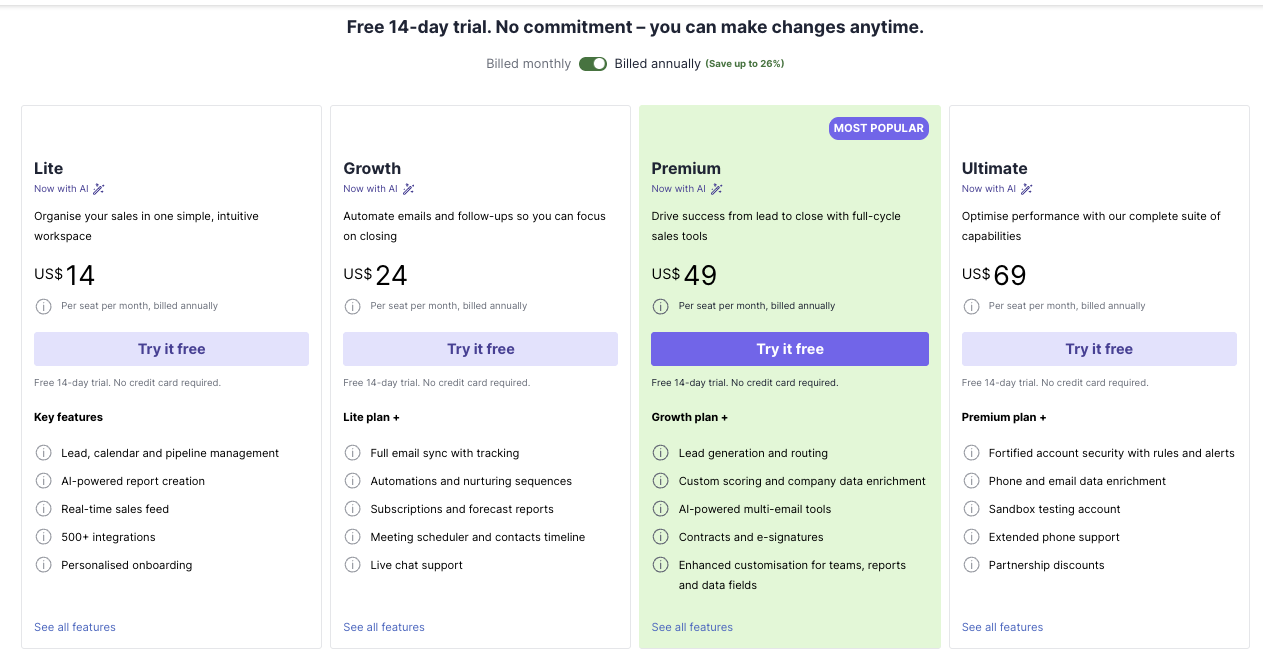
Lite : $14–20/user/month
Growth : $24–35/user/month
Premium : $49–60/user/month
Ultimate : ~$69/user/month
Straightforward per-user pricing.
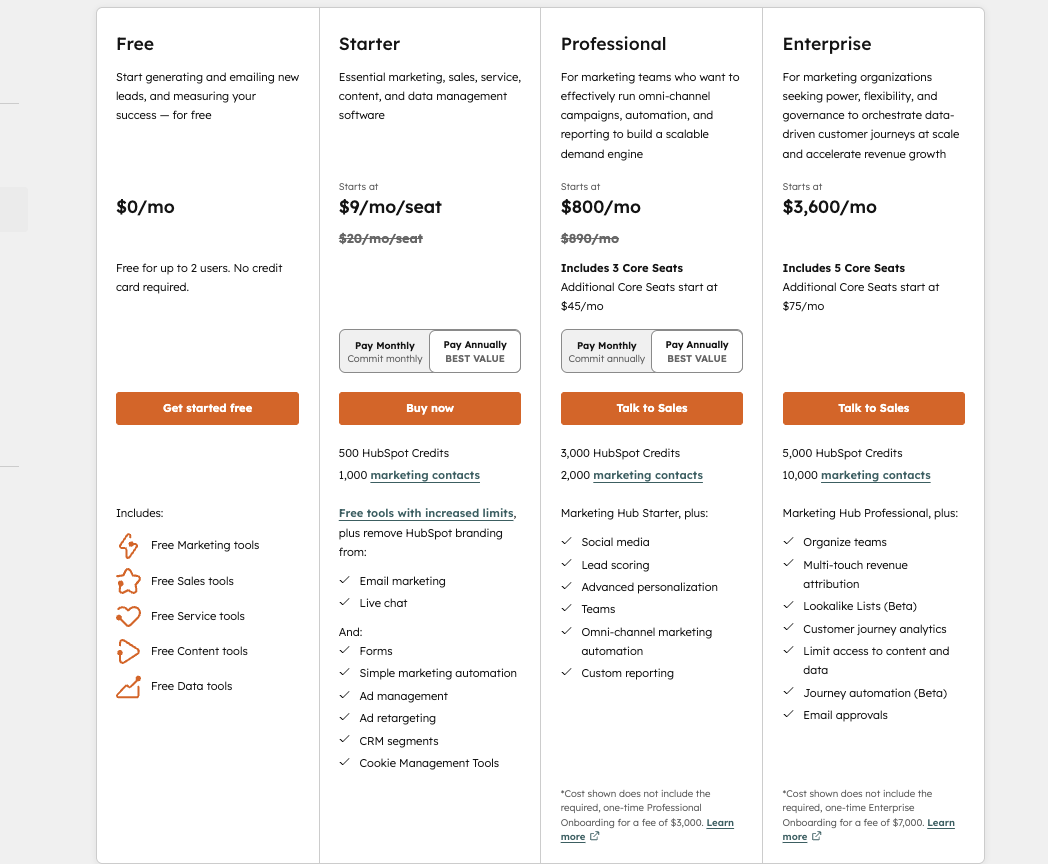
Starter: ~$9/user/month (limited features)
Professional: ~$45+/user/month
Enterprise: $75+/user/month
Add Marketing Hub?
Costs rise fast.
Complex marketing workflows
Multi-department alignment
Enterprise customization
Marketing + sales alignment
Customer journey tracking
Cross-department collaboration
If you’re under 20 employees → Pipedrive is usually enough.
If you’re building a multi-team operation → HubSpot scales better.
Needs:
Pipeline visibility
Follow-up reminders
Simple reporting
→ Pipedrive fits better.
Needs:
Lead scoring
Automated nurture
Campaign tracking
→ HubSpot makes more sense.
Needs:
Revenue forecasting
Custom workflows
Cross-team collaboration
→ HubSpot Enterprise.
Here’s the uncomfortable truth:
Most businesses using HubSpot only use 30–40% of its features.
If you’re not leveraging:
Automation workflows
Attribution tracking
Advanced segmentation
You’re overpaying.
If your sales model is outbound-heavy → Pipedrive likely delivers better ROI.
If your revenue engine is inbound marketing-driven → HubSpot can justify its cost.
For sales-only teams, yes. For marketing automation, no.


A detailed comparison of Airtable and Smartsheet, focusing on database flexibility, automation, and enterprise controls.
We evaluate chat UX, integrations, security, and pricing to help IT teams pick the right collaboration platform.

Discover which note-taking app reigns supreme. We compare Notion and Obsidian across features, pricing, collaboration, and use cases to help you choose the perfect tool for your workflow.